Managing complex network systems can leave even skilled IT managers searching for reliable answers. For Stockholm-based SMEs, the difference between smooth operations and constant headaches often comes down to the strength of your professional network and the quality of your infrastructure. Building authentic connections with trusted industry peers helps you discover practical solutions, while high-performance Ubiquiti Unifi networks deliver secure, scalable control across your business. Learn how genuine networking and modern technology work hand in hand to drive efficiency and keep your company connected.
Table of Contents
- Professional Networking: Definition and Myths
- Common Networking Myths
- What Networking Actually Is
- Why This Matters For Your Business
- Networking Models and Core Processes
- The Seven OSI Layers Explained
- Core Networking Processes
- Why Models Matter For Your SME
- Key Features of Ubiquiti Unifi Networks
- Installation and Maintenance Considerations
- Common Challenges and Reliable Solutions
Key Takeaways
| Point | Details |
|---|---|
| Genuine Networking Builds Trust | Focus on creating meaningful relationships rather than collecting contacts; invest time in helping others to foster reciprocity. |
| Networking is Not Just for Job Hunting | It’s vital for accessing collaborations, mentorship, and industry knowledge throughout your career, not just during job searches. |
| Authenticity is Essential | Engaging with genuine interest and a spirit of giving enhances the depth of your professional connections. |
| Utilise Networking Models for Clarity | Understanding frameworks like the OSI model helps streamline communication and troubleshooting within networks. |
Professional Networking: Definition and Myths
Professional networking means building genuine relationships with colleagues, industry contacts, and peers to exchange ideas and create opportunities. It goes far beyond collecting business cards or LinkedIn connections. The real foundation is authentic connection based on mutual trust and value.
Building lasting professional relationships requires time, reciprocity, and genuine interest in others’ success. This approach contrasts sharply with transactional networking, where people chase immediate benefits without investing in real relationships.
To clarify the main distinctions between genuine networking and transactional networking, here’s a concise comparison:
| Aspect | Genuine Networking | Transactional Networking |
|---|---|---|
| Goal | Build mutual trust | Seek immediate benefit |
| Relationship depth | Deep and lasting | Shallow and short-term |
| Approach | Offer help first | Ask for favours quickly |
| Long-term value | Grows over time | Fades after exchange |
Common Networking Myths
Many professionals hold misconceptions about what networking actually does:
- Myth: Networking is only for job hunting – Reality: It opens doors to collaborations, mentorship, partnerships, and knowledge sharing throughout your career.
- Myth: You need to collect hundreds of contacts – Reality: Smaller circles of genuine relationships deliver far more value than shallow mass connections.
- Myth: Networking happens only at formal events – Reality: Meaningful connections form through online communities, industry forums, and everyday workplace interactions.
- Myth: Networking is selfish or manipulative – Reality: Effective networking is reciprocal—you offer value to others just as you receive it.
What Networking Actually Is
Networking involves building and maintaining informal relationships that support your work goals and professional growth. These connections provide access to resources, knowledge, social support, and opportunities you wouldn’t find alone.
For IT managers at SMEs, this means connecting with other technical leaders facing similar challenges. You share insights about infrastructure decisions, security concerns, and operational strategies. These relationships become invaluable when you need advice on implementing solutions like Ubiquiti Unifi networks or navigating vendor partnerships.
Networking also creates long-term professional friendships. People you meet today may become collaborators, mentors, or trusted advisors for years to come.
Authentic networking isn’t about what you can get—it’s about building trust and mutual value over time.
Why This Matters for Your Business
Strong professional networks help you:
- Access industry knowledge before it becomes public
- Find trusted vendors and technology partners
- Solve problems faster through peer recommendations
- Build reputation and credibility in your field
- Stay informed about technology trends and best practices
When you’re evaluating network infrastructure solutions or planning system upgrades, having a trusted network of peers makes the decision-making process smoother and more informed.
Pro tip: Start by identifying five people in your IT community you genuinely respect, then reach out with a specific question or offer a helpful resource—authentic relationships build from genuine interaction, not random contact requests.
Networking Models and Core Processes
Networking models give you a structured way to understand how devices communicate. They break down complex operations into organised layers, making it easier to design, manage, and troubleshoot your infrastructure. Think of them as blueprints that standardise how data moves across your network.

The OSI (Open Systems Interconnection) model is the industry standard. Understanding the OSI model’s seven layers helps you grasp how communication actually works. Each layer handles specific functions, from the physical cables and switches at the bottom to applications running on your devices at the top.
The Seven OSI Layers Explained
Here’s what happens at each level:
- Physical layer – Your cables, connectors, and hardware transmit raw data signals.
- Data link layer – Switches and network cards manage direct device-to-device communication.
- Network layer – Routers direct traffic and handle IP addressing.
- Transport layer – Protocols like TCP ensure reliable data delivery.
- Session layer – Manages connections between applications on different devices.
- Presentation layer – Handles data formatting and encryption.
- Application layer – Your actual software and services users interact with.
For IT managers running Ubiquiti Unifi systems, understanding these layers helps you diagnose problems faster. A connectivity issue might be physical hardware (layer 1), VLAN configuration (layer 2), or routing problems (layer 3).
Here is a summary of the seven OSI layers and their practical relevance to IT management:
| OSI Layer | Main Function | Common Issue Detected |
|---|---|---|
| Physical | Hardware transmission | Faulty cables |
| Data Link | Direct connections | VLAN misconfigurations |
| Network | Routing and addressing | Incorrect IP setup |
| Transport | Reliable delivery | Dropped connections |
| Session | Manage sessions | Application logouts |
| Presentation | Data formatting | Encryption errors |
| Application | User interaction | Service failure |
Core Networking Processes
Critical networking processes include data encapsulation, addressing, and routing. These processes work across multiple layers to move data from source to destination reliably.

Data encapsulation wraps information at each layer, adding headers and security details. Addressing ensures packets reach the right device using IP addresses and MAC addresses. Routing determines the path data takes across your network.
Error detection catches problems before they disrupt your operations. Session management maintains stable connections between devices.
These fundamental processes work together—understanding them transforms you from someone who follows instructions into someone who actually fixes network problems.
Why Models Matter for Your SME
When you evaluate network solutions or troubleshoot connectivity issues, models provide a common language. Your technology partners reference these layers. Your team uses them to diagnose problems systematically.
Knowing these processes also helps you appreciate what systems like Unifi controllers do behind the scenes. They manage multiple layers simultaneously, orchestrating device communication, security policies, and traffic flow.
Pro tip: When troubleshooting network issues, work methodically from the physical layer upwards—check cables and hardware first, then address VLAN and routing configuration, and finally examine application settings.
Key Features of Ubiquiti Unifi Networks
Unifi networks stand out because they combine powerful hardware with intelligent centralised management. Unlike fragmented systems where access points, switches, and routers operate independently, Unifi ties everything together into one unified ecosystem.
The backbone of this system is the UniFi Controller—software that manages your entire network from a single dashboard. You configure access points, monitor performance, set security policies, and troubleshoot issues without touching individual devices. This guide on UniFi Controller benefits explains how centralised management transforms network administration.
Hardware That Works Together
Unifi’s strength lies in seamless integration across devices:
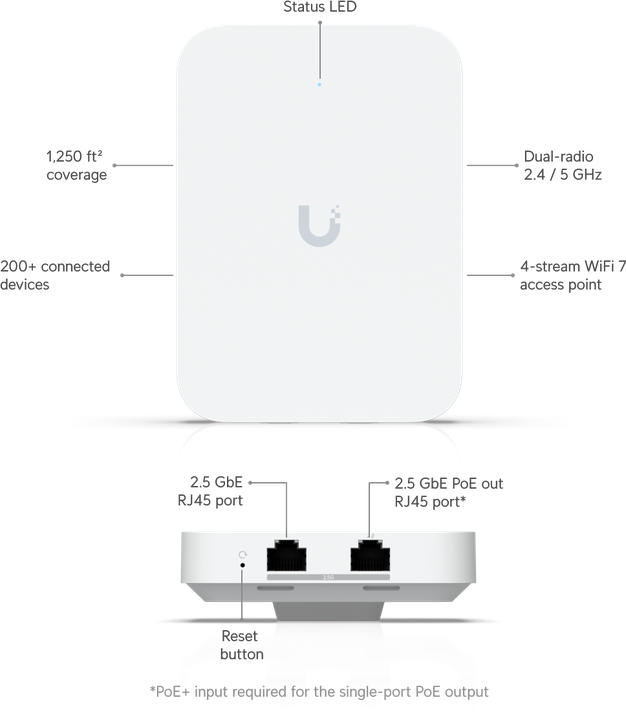
- Access Points – Wi-Fi 7 access points deliver multi-band capability with speeds reaching 2.5 Gbps uplink capacity for demanding environments.
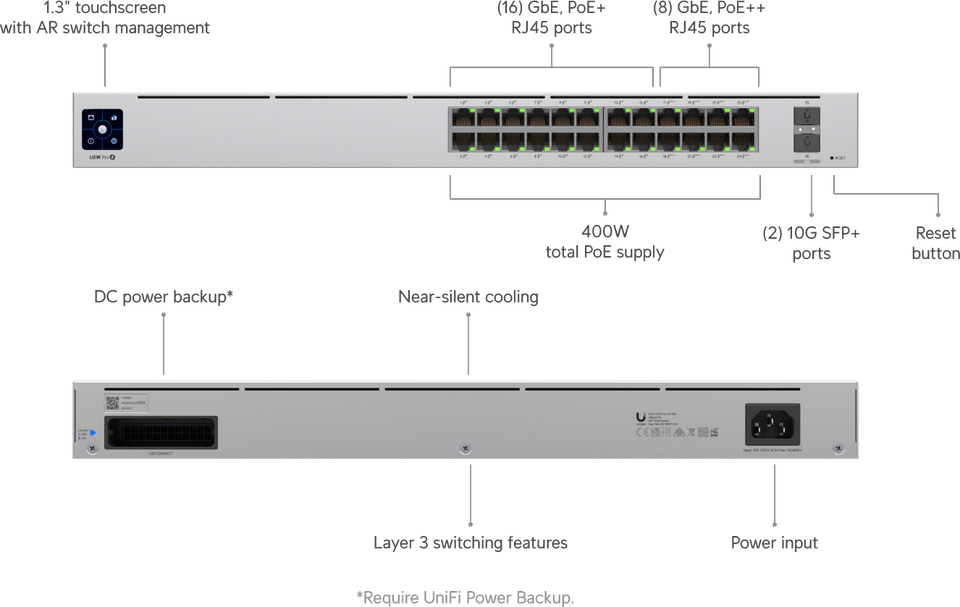
- Switches – Managed switches with Power over Ethernet (PoE) eliminate separate power cables and simplify installation.
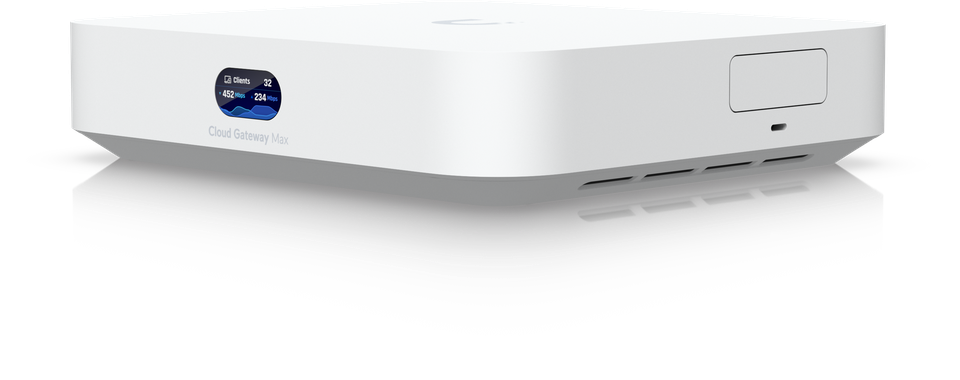
- Security Gateways – Unified firewalls and threat detection work across your entire network.
- Controllers – On-premises or cloud-based management gives you flexibility for how you operate.
Every component communicates using common protocols, so adding new hardware expands your network without compatibility headaches.
Centralised Control and Remote Access
Managing a network from one location changes everything. The UniFi Controller software provides real-time visibility into connected devices, bandwidth usage, and network health. You see problems before they impact your users.
Cloud access means you manage your network remotely—critical for SMEs with multiple sites or remote team members. Whether you’re in the office or working from home, your network stays under control.
Centralised management transforms reactive troubleshooting into proactive network optimisation.
Enterprise-Grade Security Built In
Unifi systems include advanced security features across all layers. VLAN support isolates traffic for sensitive departments. Advanced threat detection identifies suspicious activity. Guest networks segment visitor traffic separately from your business operations.
For IT managers handling confidential data, these security features operate transparently without slowing network performance.
Scalability Without Complexity
Starting small or growing large—Unifi scales effortlessly. Add more access points across your office. Deploy additional sites. Manage everything from the same controller.
This scalability matters for Stockholm-based SMEs planning future growth. Your network investment protects itself as your business expands.
Pro tip: Install your UniFi Controller in a stable, accessible location with reliable power and internet connectivity—the controller’s stability directly impacts your entire network’s reliability and responsiveness.
Installation and Maintenance Considerations
Proper installation sets the foundation for a reliable Unifi network. Getting it right from the start means fewer problems later and smoother day-to-day operations. Most installation issues stem from rushing through initial setup or overlooking physical placement.
The process starts straightforwardly: connect your Unifi device to power via Power over Ethernet (PoE), link it to your network, and configure it through the UniFi Controller software. UniFi device installation involves connecting hardware and configuring settings through the controller dashboard for seamless integration.
Physical Installation Essentials
Location matters more than most people realise. Position access points centrally for optimal coverage, avoiding corners and dead zones. Mount them at ceiling height when possible—radio signals distribute better from elevated positions.
Consider cable runs carefully. Proper network cabling installation minimises interference and future troubleshooting headaches. Use quality Cat6a cabling for connections between switches and your core infrastructure.
Power over Ethernet simplifies everything. PoE eliminates separate power cables, reducing clutter and installation costs. One cable carries both data and power to your access points.
Firmware Updates and Monitoring
Keeping firmware current is non-negotiable. Ubiquiti regularly releases updates addressing security vulnerabilities and adding performance improvements. The UniFi Controller makes updates painless—schedule them during low-traffic periods.
Monitoring your network continuously prevents surprises:
- Check device status regularly through the controller dashboard
- Review bandwidth usage patterns to spot anomalies
- Monitor connection quality and client performance
- Set up alerts for offline devices or performance drops
Proactive monitoring catches problems whilst they’re small. A failing device alerts you days before it stops working entirely.
Network maintenance isn’t optional—it’s the difference between stability and chaos.
Periodic Maintenance Tasks
Schedule maintenance windows for firmware upgrades and device reboots. Rebooting occasionally clears memory and refreshes device connections. Plan these during quieter periods so users experience minimal disruption.
Document your configuration. Note VLAN settings, security policies, and device placements. This documentation saves hours when troubleshooting or recovering from failures.
Growing Your Network Safely
As your SME expands, add devices methodically. Test new access points in quiet areas before full deployment. Monitor performance during peak usage to confirm they’re handling traffic properly.
The UniFi Controller manages growth seamlessly. Adding new hardware requires minimal configuration changes because everything follows standardised settings.
Pro tip: Schedule routine firmware updates monthly and perform device reboots quarterly during off-hours to maintain peak network performance and catch potential issues before they affect your team.
Common Challenges and Reliable Solutions
Professional networking sounds straightforward until you actually try it. Most IT managers start with genuine intent but stumble on predictable obstacles. Understanding these challenges helps you navigate them confidently.
The biggest trap is treating networking as transactional. You reach out only when you need something—a vendor recommendation, a technical solution, or a job lead. Common networking mistakes include being too transactional and failing to add value to relationships, which destroys trust before genuine connections form.
The Main Challenges You’ll Face
These barriers show up repeatedly for IT professionals:
- Transactional thinking – Contacting people only when you need something feels extractive and damages relationships.
- Neglecting follow-ups – Initial conversations fade because you don’t maintain ongoing contact.
- Inconsistent effort – Networking works only when you do it regularly, not sporadically.
- Poor time management – You squeeze networking into gaps instead of treating it as a core responsibility.
- Authenticity struggles – Forcing networking interactions feels uncomfortable and shows.
Recognise yourself in any of these? You’re not alone. Even experienced IT leaders struggle with some aspect.
Building Sustainable Networking Habits
The solution isn’t complicated—it requires consistency. Make networking part of your regular routine, not something you scramble to do. Schedule monthly check-ins with contacts. Join industry forums and participate regularly. Attend Stockholm tech meetups quarterly.
Offer help proactively. When you see a peer struggling with infrastructure decisions, share insights freely. This builds reciprocal relationships where people want to help you back.
Executives navigating career transitions face additional challenges. Managing networking during career transitions and overcoming discomfort in reaching out requires deliberate planning and authentic engagement rather than forced interactions.
Authentic networking is reciprocal—you give first, then receive naturally.
Overcoming Discomfort and Building Confidence
Many IT professionals feel awkward reaching out to strangers. That discomfort lessens when you focus on genuine curiosity instead of personal gain. Ask questions. Learn what challenges others face. Share relevant experiences.
Set specific networking goals. Target meeting one new contact monthly. Maintain contact with five key people. Contribute to three industry discussions quarterly. Concrete goals transform vague intentions into actionable progress.
Finding Your Networking Style
Not everyone thrives at large conferences. Some prefer one-on-one conversations. Others connect through online communities. Identify what feels natural to you, then commit to it consistently.
For Stockholm-based IT managers, local Unifi user groups, technology forums, and industry associations provide natural networking opportunities. These spaces attract people with shared challenges and interests.
Pro tip: Schedule monthly “relationship maintenance” time to contact five established contacts with genuine updates or helpful resources—consistency matters far more than intensity, and regular small touches build stronger networks than occasional large efforts.
Unlock the Power of Professional Networking with Reliable Ubiquiti Unifi Solutions
Professional networking offers immense value when trust and genuine relationships are at the core. However, as this article highlights, turning these connections into a secure, efficient reality requires expert network infrastructure tailored for your business needs. Whether you need seamless installation of Ubiquiti Unifi systems or professional network cabling that supports reliable performance, natverkstekniker.se provides comprehensive solutions designed for both private individuals and companies aiming to future-proof their networks.
Key offerings include:
- Complete Installation of Unifi Networks with access points, switches and gateways
- Structured and labelled network cabling with Cat6, Cat6a, or Cat7
- Centralised management through Unifi Controller for simplified monitoring and configuration
- Scalable and secure network environments optimised for performance and safety

Ready to transform your professional connections into a robust network foundation? Don’t wait for issues to arise. Act now to secure a stable and scalable Ubiquiti Unifi network built specifically for your business challenges. Visit https://natverkstekniker.se, then Boka Tid with our experts today by clicking the button below.
Contact us anytime:
08 400 117 26
kontakt@natverkstekniker.se
Frequently Asked Questions
What is professional networking?
Professional networking involves building genuine relationships with colleagues, industry contacts, and peers to exchange ideas and create opportunities, rather than merely collecting business cards or connections.
Why is genuine networking important for businesses?
Genuine networking helps businesses access industry knowledge, find trusted vendors, solve problems faster, and build a reputation, all of which contribute to long-term professional relationships and success.
How can I effectively build professional relationships?
To build effective professional relationships, offer help first, maintain regular contact, participate in industry forums, and show genuine interest in others’ success.
What common myths about networking should I be aware of?
Common myths include the belief that networking is only for job hunting, that you need to collect numerous contacts, and that networking only occurs at formal events. In reality, quality interactions are more valuable than quantity.